
GHQ Roll No Slip 2026 Download via amdte-rect.gov.pk and check online your test date. GHQ has sent messages to all candidates who apply for jobs. Currently, It is taking written test for candidates who have selected Rawalpindi as test center. All applicants should activate their registered contact numbers. If you have not got message of roll no slip, visit the official website amdt-rect.gov.pk and check your roll no slip. GHQ Jobs written test date is 18th to 21st August 2026. Thousands of number candidates are waiting for the written test date.
GHQ Roll No Slip 2026 Download @amdte-rect.gov.pk
To get your GHQ Jobs Test Roll No Slip for 2026, visit the official recruitment portal at amdte-rect.gov.pk. Shortlisted candidates can safely retrieve their roll numbers and download test or interview call letters using the website’s “Check Application Status” feature, even without receiving SMS notifications.
FGEI SST Jobs 2026 Online Apply via fpsc.gov.pk
| Title | GHQ Jobs Test Roll No Slip 2026 amdte-rect.gov.pk |
| Category | Roll No Slip |
| Test Date | 18th to 21st August 2026 |
| Test Venue | Rawalpindi, Lahore, Karachi |
| Paper Mode | Offline |
| Total No | 100 |
| Passing Marks | 33% |
| Official Website | Amdtc-rect.gov.pk |
| Shared by | Ncciajobs.pk |
amdte-rect.gov.pk Roll No Slip
amdte-rect.gov.pk Roll No Slip GHQ allows candidates to check and download their GHQ Civilian Jobs 2026 roll number slip online. The slip contains important details such as the test date, time, and examination center.
Download Roll No Slip
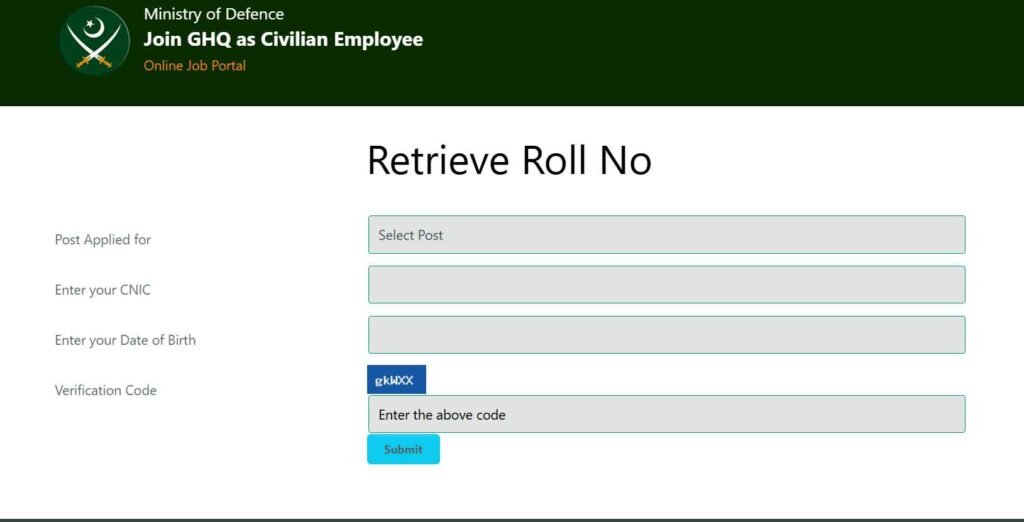
GHQ Written Test Roll No Slip 2026 Uploaded
The GHQ Jobs 2026 Written Test Roll No Slips are now available on the official portal, amdte-rect.gov.pk. Shortlisted candidates can visit the site’s ‘Check Application Status’ section to retrieve their roll numbers and download test or interview call letters.
How to Download GHQ Jobs Test Roll No Slip 2026?
-
Visit the website: Go to amdte-rect.gov.pk.
-
Find the portal: Click on Check Application Status in the Candidates’ Area.
-
Enter details: Input your CNIC to access your record.
-
Print: Download and print the Roll No Slip displayed on your screen.
Quick Tips:
-
Use the Retrieve Roll No. button on the site if you forgot yours.
-
Don’t wait for an SMS—check the portal directly if you expect to be shortlisted.